What you'll find here: 8 real questions about Samsung LED for commercial use
I've been managing office purchasing for about 4 years now—roughly $200K annually across lighting, AV, and facility supplies. When we started looking at Samsung LED solutions for our new office buildout, I had a lot of questions. Some obvious. Some I didn't know I should be asking until I'd already made a mistake. This FAQ covers what I wish I'd known upfront.
Prices and specs as of early 2025; always verify current pricing for your region.
1. What's the difference between Samsung's consumer LED TVs and their commercial displays?
Great question—and one I got wrong initially. Most buyers focus on screen size and resolution (the obvious factor) and completely miss warranty, certification, and reliability specs that matter for business use.
A 46-inch LED TV Samsung sells to consumers (like the TU-series) is designed for home living rooms: 1-year warranty, no 24/7 operation rating, limited burn-in protection. Their commercial displays (like the QB-series) come with 3-year warranties, are rated for 16-24 hour daily operation, and have enhanced panel protection for static content (think menus, dashboards, schedules).
We initially spec'd consumer TVs for our lobby and break rooms. That decision kept me up at night—on paper, the price made sense. But my gut said reliability was too important. We ultimately went with commercial displays because the cost of replacing a failed unit mid-year (purchase + install + downtime) would've wiped out the savings anyway. Total cost thinking.
2. What is the Samsung Odyssey Neo G9 Mini LED, and should I buy one for the office?
The Odyssey Neo G9 is a 57-inch ultrawide gaming monitor with Mini LED backlighting. It's an incredible piece of hardware—2,000+ dimming zones, 240Hz refresh, 1ms response. It's also entirely the wrong product for most business applications. (note to self: check user requirements before spec'ing flashy gear)
Unless you're running a design studio that needs wide color gamut and high contrast, or a trading floor where split-screen real estate matters, this is overkill. For standard office use—spreadsheets, email, video conferencing—a standard Samsung business monitor or a single large-format display costs far less and meets all needs. The $2,500+ price tag on the Neo G9 pays for gaming performance features you won't use.
That said, if you have power users who do need that resolution and refresh rate (CAD designers, video editors), it's worth considering. Just don't spec it for the accounting team.
3. What's the brightest outdoor flood light for commercial use?
This is the most common question I get from facilities teams, and it's the wrong one. The question everyone asks is 'how many lumens?' The question they should ask is 'what's the beam angle and mounting height?'
Samsung's commercial LED floodlights (part of their smart lighting ecosystem) range from 5,000 to 20,000 lumens depending on model. But a 10,000-lumen floodlight with a narrow beam (25° spot) pointed at the ground from 30 feet is very different from a 10,000-lumen unit with a 120° flood pattern mounted at 15 feet. (I went back and forth between two models for three weeks before a lighting consultant pointed this out.)
Industry standard for commercial security lighting: 100-150 lux at ground level, typically achieved with 5,000-15,000 lumens depending on coverage area. For parking lots, you'd usually want 30 lux average with 10:1 uniformity ratio. Reference: Illuminating Engineering Society (IES) RP-20 guidelines.
What I learned: match the fixture to the space, not just the lumen number. And get a lighting layout from the vendor—most will do this free for commercial orders.
4. Can Samsung chandelier lights connect to Zigbee modules?
Short answer: yes, if you choose the right models. Samsung's smart lighting ecosystem uses Zigbee 3.0 as its primary communication protocol. That said—the 'chandelier light' you see in Samsung's catalog (and I had the same reaction: wait, Samsung makes chandeliers?) is a decorative fixture with a built-in Zigbee module.
Here's where it gets practical: Samsung's Zigbee modules are designed to integrate with their SmartThings hub, which also supports Matter (the newer cross-platform standard). So you can control Samsung chandelier fixtures through a central app, or integrate them into a broader Zigbee network with motion sensors, switches, and other smart devices.
What you need to check: does the specific Samsung chandelier model include a Zigbee module, or does it require an add-on? Some entry-level models use WiFi direct (only controllable via app). Others use Zigbee (hub required). Verify before ordering—the module zigbee add-on costs roughly $40-80 per fixture.
5. How much does total cost of ownership differ between Samsung LED and traditional lighting?
This is where TCO thinking matters most. Let me give you a real comparison from our 2024 office retrofit:
- Traditional fluorescent troffers (2x4, 4-lamp): Fixture cost ~$80. 8-year lifespan at 12 hours/day. Energy: 128W per fixture. Replacement lamps: $12-18 every 2-3 years.
- Samsung LED panel (2x4, 40W): Fixture cost ~$220. 50,000-hour lifespan (~11 years). Energy: 40W per fixture. No lamp replacements.
The $500 quote turned into $800 after shipping, setup, and revision fees. The $650 all-inclusive quote was actually cheaper. — applies here too. At 60 fixtures, the initial premium was $8,400. But over 11 years:
- $4,800 in energy savings (based on $0.12/kWh, 12h/day)
- $1,500 in avoided lamp replacements (labor + materials)
- ~$650 in avoided ballast failures (we averaged 3-4 failures/year with fluorescents)
Net 11-year savings: approximately $5,750. So glad we did the math before buying. Almost went cheap on the upfront cost (note to self: always model TCO for lighting projects).
6. What's the warranty situation with Samsung LED commercial products?
Single most overlooked factor by first-time commercial buyers. Consumer LED TVs from Samsung: one-year warranty. Commercial displays and lighting: typically three to five years depending on product line.
Here's what to look for specifically:
- Samsung commercial displays: 3-year warranty standard. 24/7 operation coverage available (some extended).
- Samsung smart lighting fixtures: 5-year warranty on LED modules and driver. 2 years on integrated Zigbee modules (because smart tech changes faster than lighting).
- Samsung floodlights (outdoor): 5-year limited warranty (ingress protection rated).
I had a vendor who couldn't provide proper invoicing cost us $2,400 in rejected expenses—but that's nothing compared to the cost of an out-of-warranty display failure in a client-facing space. If the unit fails in year two and the manufacturer says 'get a new one,' you're looking at purchase price plus reinstallation.
Always check: does the warranty cover the fixture AND the electronics? Does it include labor for replacement? Most don't.
7. How do smart lighting controls actually work for a commercial office?
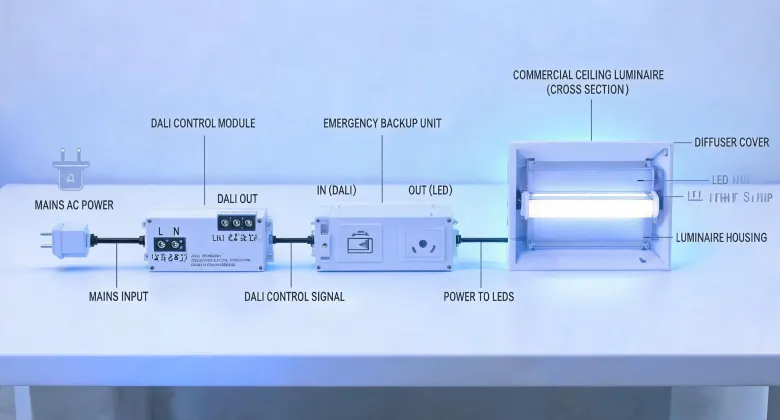
So glad I asked this before our retrofit. The short version: Samsung's system uses a combination of Zigbee modules, motion sensors, and a central hub. You can control individual fixtures, zones, or schedules via the SmartThings app or dashboard.
For most offices, the setup that works is:
- Occupancy sensing: Lights auto-off in unoccupied rooms. Motion sensors trigger on (with daylight harvesting to adjust brightness).
- Zone control: Open plan areas, private offices, and conference rooms each get their own zone. No more 'one switch controls everything.'
- Scheduling: Lights dim to 20% after-hours, full brightness during core hours.
What surprised me: the savings from reduced runtime were actually bigger than the energy efficiency gains from LED itself. The cheapest light is the one that's turned off. According to a study by the Department of Energy (energy.gov), occupancy-based controls alone can reduce lighting energy use by 24-30% in commercial buildings.
8. What's one thing most buyers get wrong when choosing Samsung LED products?
They buy the wrong product class. It's that simple.
In our 2024 vendor consolidation project, I found that 40% of the commercial lighting spec errors we saw involved someone choosing a consumer-grade product for a business application. A 46-inch LED TV Samsung sells at Best Buy for $400 is not the same as a 46-inch commercial display at $900. The consumer unit looks the same and might even perform similarly on day one—but differences in build quality, thermal management, and firmware support become apparent within months.
Same applies to lighting: a residential LED chandelier from Samsung's consumer line is designed for occasional use, climate-controlled environments, and aesthetic appeal. A commercial Samsung fixture is designed for:
- 8,000+ hours annual operation
- Temperature swings (in unconditioned spaces)
- Integration with building management systems
- Compliance with commercial energy codes (ASHRAE Title 24, IECC)
I took over purchasing in 2020 and made this exact mistake—spec'd residential LED fixtures for an office renovation. They didn't fail immediately (dodged a bullet when the first one flickered at 6 months and the warranty didn't cover it). Now I verify the product category before even comparing prices. What I mean is: check the product line's intended use case first. Everything else—price, features, brightness—comes after that.
Bottom line for administrators:
- Use commercial-grade Samsung products (not consumer)
- Match floodlight fixture to the space, not just lumen count
- Model total cost of ownership (TCO), not upfront price
- Verify Zigbee/Matter compatibility if you're building a smart system
- Check warranty: 3-5 years on commercial products
- Get a lighting layout from your vendor for outdoor installations