There is no single 'best' Samsung LED product. That's the first thing I learned—the hard way. The right choice depends entirely on what you're trying to do. Are you lighting up a retail space? A control room? An office lobby? A home theater?
Over the last five years, I've managed procurement for over 50 commercial and residential LED installations. In my first year (2018), I made the classic mistake: I ordered a top-tier Samsung 4K Smart TV for a digital signage application. It looked amazing on paper. The problem? It wasn't built for the 16-hour daily runtime and direct sunlight that hit the screen. I had to replace it within six months. That mistake cost us about $1,200 in redo and a very unhappy client.
Since then, I've developed a checklist based on four common scenarios. The goal of this guide is not to tell you which model to buy, but to help you identify your scenario so the choice becomes obvious.
The Four Scenarios (How to Know Which One You Are)
Most selection problems come down to answering two core questions:
- What is the primary environment? (Indoor climate-controlled vs. Outdoor/uncontrolled vs. High-ambient-light)
- What is the primary content? (Static info/Dynamic video/Navigation/Brand display)
Your answers will place you into one of these four buckets:
- Scenario A: The 'Always-On Signage' (High brightness, commercial reliability)
- Scenario B: The 'Ambient Lighting Fit-Out' (Downlights, light bars, smart integration)
- Scenario C: The 'High-End Meeting Room/Boardroom' (Precision, color accuracy, low glare)
- Scenario D: The 'Budget-Conscious General Use' (Quality vs. cost trade-off)
Scenario A: The 'Always-On Signage'
If you need a screen that runs 16+ hours a day, seven days a week, you are not buying a TV. You are buying a commercial display. The Samsung QB series (like the QMxxB or QHxxB) is specifically designed for this.
When you choose this: You need high brightness (over 500 nits), a fan for cooling, and a panel rated for 24/7 operation. The Samsung LED 3D effect you see in showrooms is not the priority; reliability is.
What I've learned the hard way: In September 2022, I tried to save money by ordering a consumer Samsung LED 4K Smart TV (a gorgeous Q80B) for a client's lobby. It was in a temperature-controlled building. It failed after six months—dead pixels in the corner. The Samsung repair technician confirmed: 'This model is simply not designed for this kind of use.' Replacing it with a dedicated QH series display cost more upfront but has been running perfectly for 18 months as of May 2024. The lesson: Don't confuse 'best picture quality at home' with 'best reliability for business.'
"The conventional wisdom is that a 'higher-resolution' 4K TV is always better than a 1080p commercial display. My experience with signage suggests otherwise. A 4K TV running 18 hours a day will burn out its backlight faster than a 1080p commercial display designed for that workload."
Scenario B: The 'Ambient Lighting Fit-Out'
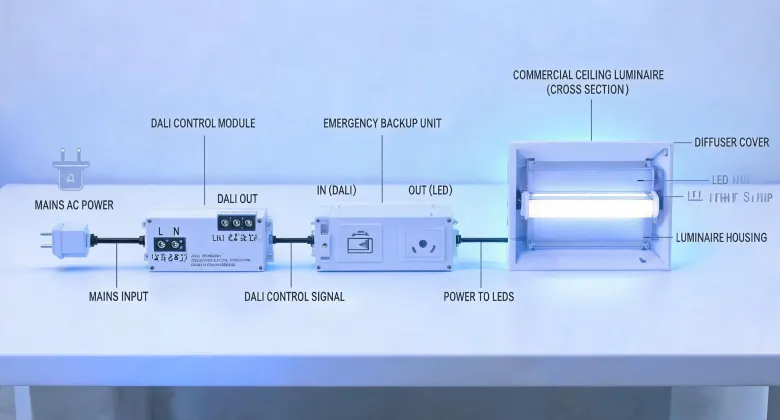
This is for architects, interior designers, or contractors wiring a new office or a high-end residence. You're not buying a screen; you're buying the lighting fixtures. This is where terms like ceiling downlight, downlight light, or light bar come into play.
When you choose this: You are wiring a new ceiling. You need consistency in color temperature (like 3000K or 4000K). You may need smart lighting integration with Zigbee or SmartThings. This is where the Samsung Smart Lighting ecosystem shines.
Small client, big lesson: I once handled an order for a small startup that wanted a Samsung LED chandelier and recessed downlights for their new co-working space. The total order was about $800. A big supplier told me their 'standard' minimum order for that specific chandelier was 20 units. The startup only needed 2. I found a smaller supplier who was willing to work with me on a sample run. That client? They now place orders of $5,000+ per year. Small doesn't mean unimportant—it means potential.
Practical tip for wiring: If you're installing a ceiling downlight, always check if it comes with a junction box or if you need to buy one separately. A mistake with how to wire a single light switch can turn a 30-minute job into a 2-hour headache. Always verify the wiring diagram before cutting holes in your ceiling. (Should mention: I learned this after cutting 12 holes for a model that required a different gauge wire. That was an expensive drywall repair.)
Scenario C: The 'High-End Meeting Room/Boardroom'
This is about precision and presentation. The client is a law firm, a design agency, or a C-suite executive. The screen is the focal point of the room. Glare must be zero, and colors must be accurate for presentations or video conferencing.
When you choose this: You are looking at the Samsung Neo QLED 8K or the Micro LED series. The price is high, but the performance is unmatched. You should also consider a high-end LED light bar for indirect wall illumination to reduce eye strain during long meetings.
One detail that matters: Color accuracy. The display must be Pantone-validated for realistic color matching. Industry standard color tolerance is Delta E < 2 for brand-critical colors (Reference: Pantone Color Matching System guidelines). Consumer TVs often have Delta E above 4, which means your presentation's brand colors will look 'off.'
My filter for this client: If the client asks about 'color space coverage' or 'calibration reports,' they are a Scenario C. If they just ask 'how many inches is it?', they are usually in Scenario A or D.
Scenario D: The 'Budget-Conscious General Use'
This is the hardest scenario because you have to make smart trade-offs. You need a decent screen for a break room, a small waiting area, or a project on a tight budget. You don't need 24/7 operation or 8K resolution.
When you choose this: You are looking at the Samsung LED TV in the 4K smart TV category (like the CU8000 or BU8000 series). These are fantastic for general use but have a lower build quality for commercial reliability.
My biggest regret: In Q1 2023, I ordered 15 of these for a hotel renovation to save money. The hotel manager wanted them for guest rooms. After the third unit was cracked by a guest's suitcase in two months, I realized I should have ordered a model with a more durable bezel or a tempered glass screen. We didn't have a formal specification review process for 'low-risk' items. After that incident, I created a 'hazard potential' checklist for all TV orders. Look, I'm not saying cheap options are always bad. I'm saying they're riskier in specific environments.
How to Know Which Scenario You Are (The 3-Question Test)
Still unsure? Ask yourself these three questions in order:
- Will the screen run for more than 10 hours a day? Yes → Scenario A (Signage). No → Go to question 2.
- Is color accuracy or anti-glare critical for the professional image? Yes → Scenario C (Boardroom). No → Go to question 3.
- Are you integrating it into a new building fit-out (downlights, sensors)? Yes → Scenario B (Lighting Fit-Out). No → Scenario D (General Use).
Your answer determines your path. Matching your product to your environment is the single most important step. It's not a fun decision, but it's the one that saves you from the kind of mistakes I made in my first year. That's the real lesson.